Lightfern vs Notion: how they compare for teams using AI
Lightfern vs Notion for teams that use Claude or ChatGPT: how AI, apps, sharing and offline work compare, and where each one fits.
 Otto Szoke · 27 November 2026
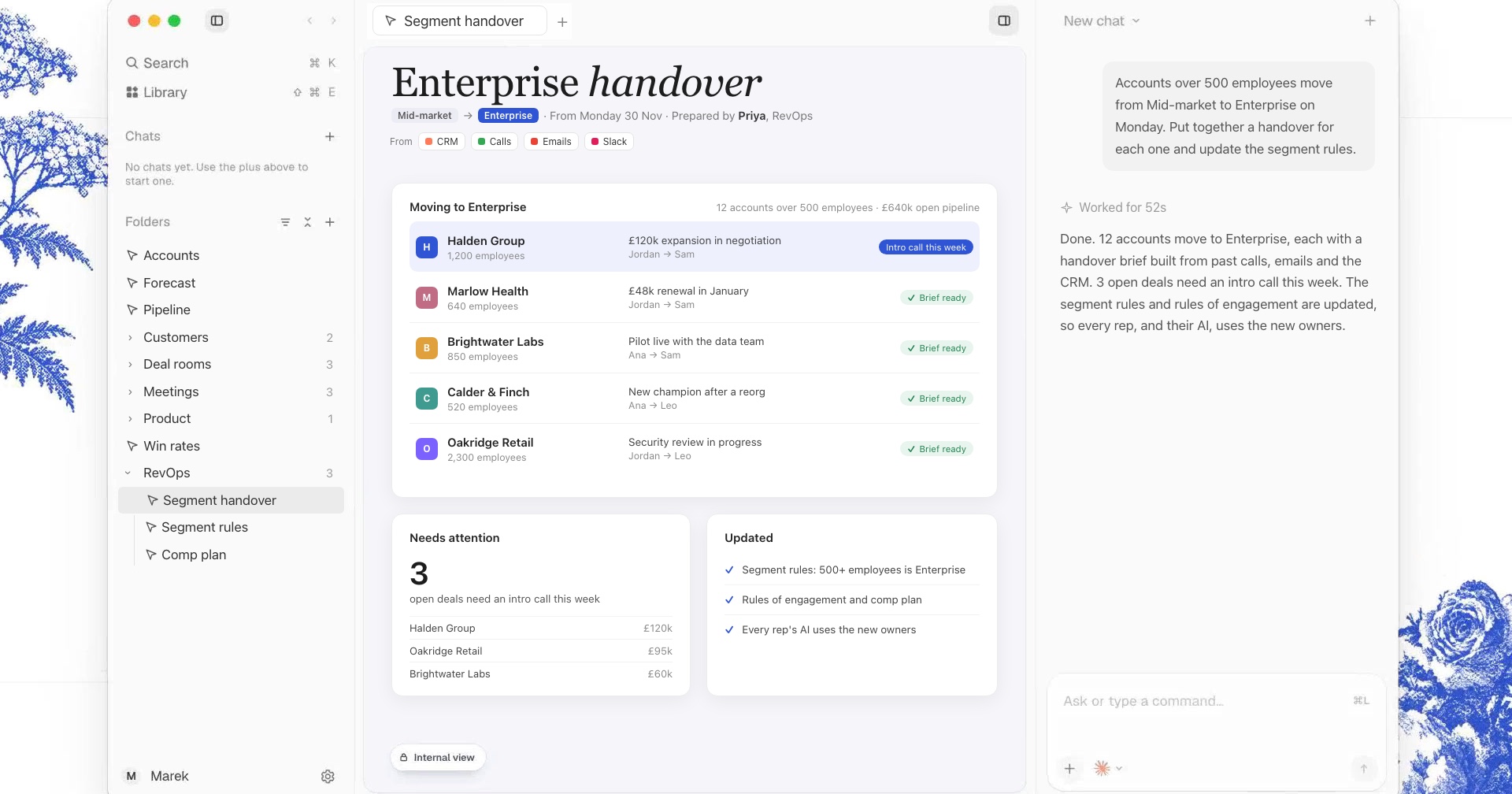
If your team keeps its docs in Notion and does more and more of its work in Claude or ChatGPT, you've probably noticed the gap: what gets made with AI rarely makes it back to where everyone else can find it.
Notion is a workspace for docs, wikis and databases, with Notion AI built in. Lightfern is a desktop workspace for your team's docs and apps, running on the Claude or ChatGPT account each person already has. It's built for the work your team makes with AI, so it lives somewhere the whole team, and their AI, can keep using.
Lightfern vs Notion: the short answer
Choose Notion if you want an all-in-one workspace for docs, wikis and project databases on web, desktop and mobile, with AI built into Notion.
Choose Lightfern if your team uses Claude or ChatGPT every day and shares the results with colleagues, customers and partners, kept up to date in one place.
What does Notion offer?
- Pages and databases. Databases with views, filters and formulas, plus dashboards and templates.
- Platforms. Web, Mac, Windows, iOS and Android.
- Built-in AI. Notion AI and its agents are included in the Business and Enterprise plans, with a monthly allowance of AI credits for each member. Free and Plus include a limited trial. Notion's agents can also build forms, and interactive blocks such as calculators inside a page.
- Admin controls. Page history, workspace permissions and enterprise settings such as single sign-on.
How is Lightfern different from Notion?
It runs on the AI your team already has
Lightfern doesn't come with its own AI. Each person signs in with the Claude or ChatGPT account they already pay for, and Lightfern's AI requests go through that account.
No extra AI cost. Whichever Lightfern plan you're on, it runs on your own Claude or ChatGPT account, so there's no separate AI bill from us. Claude users need a paid Claude plan (Pro or above), since the free plan doesn't include the access Lightfern runs on. Any ChatGPT plan works, including the free one.
Claude and ChatGPT users in one space. Half your team on Claude and half on ChatGPT? They all work in the same shared folders, each with their own AI.
Your connected tools come with you. Lightfern can use the tools you've already connected to your Claude or ChatGPT account. More on this in Using Lightfern with Claude.
Memory you can see. Tell your AI how you work and it saves it to an AGENTS.md file, so every chat starts knowing you. Your docs and notes are plain files on your computer, so what your AI works from is something you can open, read and edit.
It gives AI work a home
For many teams, AI work follows the same cycle: chat, copy, paste into a doc or a slide, and repeat. The latest version ends up buried in one person's chat history, where even they struggle to find it, and a week later someone asks for it again.
In Lightfern, your AI works directly in your team's shared folders. What it makes is saved there as a doc or an app the whole team can open, edit and build on. Change it once, and everyone works from the latest version, including everyone else's AI.
Apps as well as docs
Ask your AI for a deal room, an account handover or a project tracker, and it builds a working app in the same folder as your docs. It's the real thing, not a mock-up: your team uses it, and your AI can update it when the content behind it changes.
Apps over the files you already have. A CRM over your contact notes, a hiring pipeline over your candidate files, a dashboard over a launch plan. The files stay plain files, and the app is just a better way to work with them.
Apps inside your docs. Drop part of an app into a doc as a widget, like the open tasks or the days left before a launch, and the doc stays up to date on its own.
Apps anyone can use. On Pro, you can host your apps online, so customers and partners use them in their browser.
Keep working offline, apps included
Your docs and notes are files on your computer, so you can keep working on a train or a plane. Apps work offline too: if you own an app or can edit it, you can keep using it with no signal. Everything syncs as soon as you're back online. Your AI needs a connection, since it runs through your Claude or ChatGPT account.
One set of rules for everyone's AI
Put a short rules note (an AGENTS.md file) in a shared folder, like "take prices from the pricing sheet in this folder, and write in UK English". Everyone's AI picks it up whenever it works in that folder and follows it as best it can.
Share with anyone
Share any doc as a link. Customers, prospects and partners open it in their browser, with no app needed, and see the latest version. Sharing is unlimited on every plan. On Pro, your team can also edit with you live in the app, even if they're on Free.
Lightfern vs Notion at a glance
| Lightfern | Notion | |
|---|---|---|
| AI | Your own Claude (Pro or above) or ChatGPT account, with no extra AI cost | Notion AI, included in Business and Enterprise plans with monthly AI credits |
| What you make | Docs, plus apps your AI builds over your files: trackers, dashboards, CRMs and deal rooms. Apps can show live inside docs, and on Pro they can be hosted online for anyone to use | Pages, wikis, databases, dashboards, forms and published sites, plus interactive blocks built by Notion's agents |
| Sharing outside | Unlimited sharing on every plan. People open your link in their browser | Pages and sites published to the web on every plan, and guests invited to pages for free |
| Offline | Docs and apps you own or can edit work offline and sync when you're back. The AI needs a connection | Pages you download for offline use, on the desktop and mobile apps |
| Platforms | Mac app (Apple silicon), with Windows and Linux on the way. Shared links open in any browser | Web, Mac, Windows, iOS, Android |
What teams make in Lightfern
A few examples. There are more on our examples page.
| Team | What they make |
|---|---|
| Sales | A deal room for each buyer, built from the latest pitch, pricing and case studies, shared as one live link |
| Marketing | Campaign briefs, messaging and brand guidelines in one shared folder, with a rules note on top. Every email, ad and social post the team drafts with AI follows the latest version, even after the messaging changes |
| RevOps | The handover when accounts move segment, say from Mid-market to Enterprise: a brief for each account from past calls, emails and the CRM, with open deals flagged. Segment rules are updated once, so every rep, and their AI, uses the new owners |
| Operations | An onboarding guide and checklist for new starters, shared as a link that opens the latest version |
Try Lightfern
Lightfern for desktop is in beta, and we're letting people in from the waitlist regularly.
Reflects Lightfern and Notion as of November 2026. Notion details come from Notion's own website, including its pricing page, release notes and help centre. Notion is a trademark of Notion Labs, Inc. Lightfern is not affiliated with or endorsed by Notion Labs, Inc.
Claude is a trademark of Anthropic. ChatGPT is a trademark of OpenAI. Lightfern is not affiliated with or endorsed by Anthropic or OpenAI.
Frequently asked questions
Is Lightfern an alternative to Notion?
For the work your team makes with Claude or ChatGPT, yes. Notion is a workspace for docs, wikis and databases, with Notion AI built in. Lightfern runs on the AI accounts your team already has, and saves what anyone's AI makes, from deal rooms and onboarding guides to account handovers, in shared folders the whole team works from.
We already connect Claude to Notion. Why would we need Lightfern?
Connecting Claude or ChatGPT to Notion lets your AI search, create and edit your Notion pages and databases. Lightfern works the other way round: your AI works inside your team's shared folders, so the docs and apps it makes are saved there for the whole team, and their AI, to work from, with one set of rules everyone's AI follows.
Does Lightfern charge for AI?
No. Whichever Lightfern plan you're on, it runs on your own Claude or ChatGPT account, so it adds no extra AI cost. On Claude, you'll need a paid plan (Pro or above). Any ChatGPT plan works, including the free one.
Where does Lightfern keep my files?
On your computer, as plain files you own, so you can open them in other apps too. Shared folders sync, so everyone you share with works from the same version.
Does Lightfern work on Windows or mobile?
Lightfern is a Mac app for Apple silicon today, with Windows and Linux versions on the way. There's no mobile app yet, but people you share with open your link in any browser, with no app needed.